How come I haven’t received any emails about car shows?
There are three possible reasons if this happens – first is of course that there are not yet shows included with MotorAlert.com that are within the range you specified. Over time, as more and more shows are added this will probably change.
The second (and most common) possibility is that the emails are being placed in your junk/spam folder of your email program. You can look and see in that folder if there are any emails from MotorAlert.com waiting for you in there, where you can mark them as “not junk/spam”.
For all email providers, be sure to add sam@motoralert.com to your contacts/address book
If you use Gmail, move MotorAlert.com’s e-mails to your primary inbox
If you use Apple Mail, add us to your V.I.P. list
If you use Outlook, add us to your favorites
If you use another e-mail client, try a combination of the above steps to see if the mails stop ending up in your junk/spam folder
The third possible reason you might not be seeing emails from MotorAlert.com is if we have had emails returned as “undeliverable” using the email address you provided at signup. This is usually a typo in your email address, so the emails will be bounced back to us. When that happens, I unsubscribe you in the system so I don’t continue to send emails to a bad email address, and I will wait for you to contact me with a corrected or different email address.
There is/was a show I know about nearby but it wasn’t shared by MotorAlert.com. How come?
Shows are added to MotorAlert.com both by the show organizers themselves, and we find publicly available information about them online and add them for users. If you know about a show and think it should be included on MotorAlert.com so everyone in your area knows about it, tell me about it by emailing tips@motoralert.com. As you know from using the service, we need either a web page/site to share with users or a flyer with sufficient details to share with users, so be sure to include one or the other in your tip.
How do I see details for a specific show that you email me about?
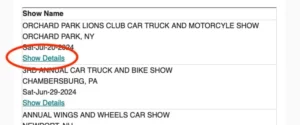
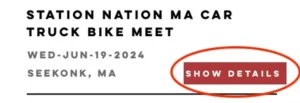
Once you’ve signed up and shared your email and home zip code, we will match you with all existing shows and new shows going forward that are within the range of travel you indicated when you signed up. For shows that are in your range, you’ll receive an email letting you know about the show, with a link for specific Show Details. Just click that link and you’ll be taken to a page or shown an image that has more show details. On your online dashboard, click the button saying Show Details next to the show you’re interested in.
Email Sample
Online Dashboard Sample
I receive emails about shows, but not texts, even though I provided my phone number. How come?
If you provided a cell phone number when you signed up but do not receive text alerts about new shows, it means the phone number you provided will not receive text messages from us. This is either because you entered a non cellular phone number (a landline), an incorrect phone number, a number that is no longer in use, or a number that is “unreachable”, meaning the phone is turned off for a prolonged period or is out of range for cellular contact.
When this happens we turn off “texting” in your profile. If you have a new number or would like to correct a number you already provided, send an email to updates@motoralert.com
Can I change the distance I indicated when I first signed up?
Yes, you can update the range you prefer to travel by using the feedback form and letting me know your new preferred range. Your reminder emails may still include shows previously matched with in line with your previous preferred range, but all new shows added will match your new distance. You should not register a second time with a different range, as that confuses the system if you are using the same email address, and you’ll simply receive duplicate notifications. A future update to the system will allow you to update this distance directly on the MotorAlert.com website without needing to contact me.
Sometimes I am notified about a show that is not in the range I specified when I signed up. How come?
This most often occurs when a user has signed up multiple times, and put in different distances each time, while using the same email address. This causes you to receive multiple notifications for the same show, and if you had a further distance in any of your sign ups that range is used, sending to you shows farther away. If you want a different range to be notified about, the best way is to let me know what your updated preferred range is at: updates@motoralert.com, using the email account you signed up with so I can correctly locate your profile. A future update in the system will ensure that only one email can be associated with a single profile.
Can I have more than one zip code included to find local shows, if I have more than one home or split my time between two locations?
A future update to the system will include this feature. For now, you can let me know your second zip code, and I can update your profile with the changed zip code while you are in a different location.
I use Outlook on my mobile phone, and sometimes I receive your emails with no content in it.
There was definitely an issue with Outlook on mobile resulting in inconsistent delivery of emails. The vendor providing the email service for MotorAlert.com has rolled out a solution and this should now be resolved. If ever you have difficulty reading a MotorAlert.com email on a mobile device, you can typically always still see your emails when viewing them on a computer email account (the problem seems to only be on mobile phones), or you can log in to your email with a web browser such as Chrome or Safari, and your emails are normally visible, even on mobile.
Sometimes when I try to go to my Dashboard using the Welcome Back page on MotorAlert.com, it doesn’t recognize me and says “no users found”?
The most frequent cause of this error has been an accidental “space” added at the end of either the first name, last name, or email when you first signed up. When this happens, and you try to log in using Welcome Back and you do not again include that extra space in one of the fields, the system does not recognize you (it needs to be an exact match, upper and lower cases, and spaces). If this happens to you, let me know through the feedback form and I can remove the extra space in the system, or figure out why the login is not working.
I’m only interested in Shows that meet a specific requirement (shows for a specific model, shows that are formally judged, Concours shows only, etc.)
Right now the only filter that’s built in is the distance from your home zip code, so you’ll receive everything that goes in the system within that range. If a lot of users request greater filtering like this, I can look in to whether that could be built in to the system. A lot of the show information doesn’t include these kinds of details, however.
Is there one place to see all shows?
MotorAlert.com is set up to be a personalized notification service, tailored to the person based on where they live, and to send notifications based on that. There is not an “all shows” page, which would be nationwide and have thousands of shows you would not be interested in. Your personal complete list of shows can be found on your Dashboard that you access through the Welcome Back page of MotorAlert.com, and each week you will receive a reminder email about your shows for the coming week..
Is there any way I can help MotorAlert.com grow or make it better?
The main goal right now is to keep adding users and adding shows, so any word of mouth you can do for that is terrific. I’ve heard from some users with feature suggestions (such as the multiple zip codes request, as mentioned above), and I welcome that as it helps build a product that I know is meeting your needs and wants. I want to build something for the people who love car shows the same way I do, and so feel like this is really beneficial. Feel free to shoot me a message at sam@motoralert.com with any other ideas you have to make the site more helpful.